Expand Your Orbit Multi-Valve System Effortlessly
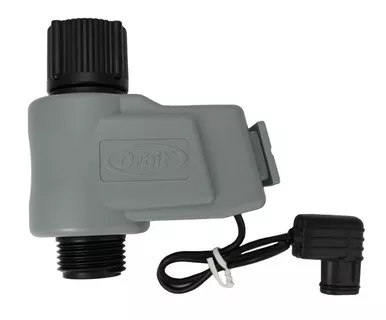
Easily add another watering zone to your landscape with the Additional Valve for the Orbit Multi-Valve LCD Battery Timer. Designed exclusively as an expansion unit for the Orbit base controller (TOR4W), this add-on valve allows you to customize and expand your irrigation setup without having to purchase an entirely new timer system. Whether you need to run a dedicated line for a new raised bed or separate your lawn from your delicate shrubs, adding a valve gives you the flexibility to meet your garden’s exact needs.
Installation is incredibly straightforward—simply attach the valve to the existing manifold and plug the connection wire into the next available numbered port on your controller. Attach a filter, pressure regulator, and 1/2″ Mainline Tubing, and you are ready to deliver precise, automated watering to a brand-new zone in your yard.
- Seamless Integration: Designed specifically for the Orbit Multi-Valve timer (TOR4W), ensuring perfect compatibility and operation.
- Plug-and-Play Setup: Attaches directly to the Orbit manifold and plugs into the controller body—no splicing or complex wiring required.
- Standard Connections: Features standard 3/4-inch male hose threads (MHT) on the outlet, ready to connect to any standard hose, drip filter, or regulator.
- Manual Override: Includes a manual lever on the valve itself for quick testing or spot watering without needing to reprogram the timer.
- Durable Construction: Made with high-impact, UV-resistant plastic built to withstand outdoor environments.
Detailed specifications for system planning.
| Specification | Details |
|---|---|
| Product Type | Expansion Valve / Add-On Valve |
| Compatibility | Orbit Multi-Valve LCD Timer (TOR4W) Only |
| Outlet Connection | 3/4″ Male Hose Thread (MHT) |
| Power Source | Powered by main Orbit controller (no extra batteries needed) |
| MPN | 58874N |
| Brand | Orbit |
Expand your Orbit timer system in a few simple steps.
Step 1: Prep the Manifold
Locate an unused port on your existing Orbit timer manifold. Unscrew and remove the protective end cap from that port.
Step 2: Attach the Valve
Align the new valve’s inlet connection with the open port on the manifold. Thread the swivel coupling onto the manifold and hand-tighten until secure to prevent leaks.
Step 3: Connect the Wiring
Take the wire extending from the new valve and plug it into the next sequential numbered receptacle (e.g., Port 3 or 4) on the back of the main controller module.
Step 4: Program Your New Zone
Using your Orbit controller’s interface, program the watering schedule, run time, and frequency for your newly installed zone.