Automated Water Conservation for DC Irrigation Systems
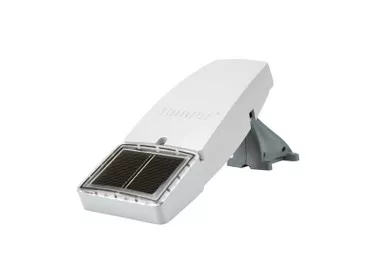
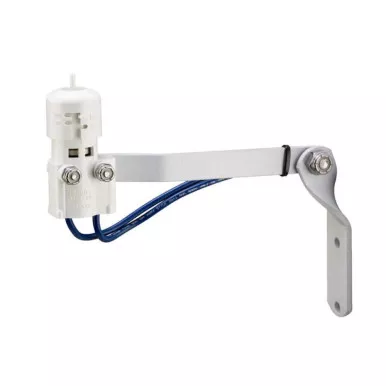
The Hunter Mini-Clik Rain Sensor (Normally Open) is a simple yet incredibly effective tool for preventing your irrigation system from running during or immediately after a rainstorm. Designed specifically for battery-operated DC timers that require a normally open circuit, this sensor acts as an automated switch. When sufficient rain falls, it interrupts your timer’s signal to the valves, saving water, reducing your utility bills, and preventing your landscape from becoming over-saturated and prone to disease.
Unlike electronic sensors that can be overly sensitive or prone to failure, the Mini-Clik relies on proven mechanical action. Inside the housing are hygroscopic disks that physically swell as they absorb rainwater, triggering the switch to pause your watering cycle. As the weather clears, the disks slowly dry and shrink, automatically resetting the system. With a fully adjustable rainfall threshold and an adjustable vent ring to control the drying rate, you can easily customize the sensor to perfectly match your local climate.
- Conserves Water: Automatically pauses scheduled irrigation cycles during rain events, preventing wasteful over-watering.
- Adjustable Rainfall Trigger: Twist the cap to set the sensor to activate after 1/8″, 1/4″, 1/2″, or 3/4″ of accumulated rainfall.
- Adjustable Dry-Out Rate: A built-in vent ring allows you to control how fast the internal disks dry, perfectly mimicking the dry-out time of your soil.
- Normally Open Wiring: Engineered specifically for irrigation controllers and battery node timers that require a Normally Open (NO) sensor circuit.
- Highly Accurate: The physical swelling of the moisture-absorbing disks provides a much more reliable and accurate reading than electronic cup sensors.
Detailed specifications for system planning.
| Specification | Details |
|---|---|
| Product Type | Mechanical Rain Sensor |
| Switch Type | Normally Open (NO) |
| Rainfall Settings | 1/8″, 1/4″, 1/2″, and 3/4″ |
| Mounting Options | Aluminum extension arm included (Eaves, fences, gutters) |
| Switch Rating | 24 VAC, 5 Amps |
| Sensing Mechanism | Hygroscopic Disks |
A quick guide to mounting, wiring, and adjusting your new weather sensor.
Step 1: Mount the Sensor
Using the included aluminum bracket, mount the sensor in a completely open location where it will receive unobstructed rainfall. Ensure it is not blocked by trees, roof overhangs, or within the spray path of your sprinklers.
Step 2: Set the Threshold
Look at the top of the sensor body. Twist the cap to align the pins with your desired rainfall threshold (1/8″, 1/4″, 1/2″, or 3/4″). We recommend starting at 1/4″ for most drip irrigation systems.
Step 3: Wire to Controller
Route the two wires from the sensor to your irrigation controller. Connect the wires to the designated sensor terminals on your battery timer. Polarity does not matter for this switch.
Step 4: Adjust the Vent Ring
Twist the vent ring at the base of the sensor body. Opening the vents completely allows the disks to dry out faster, resuming irrigation sooner. Closing the vents keeps the disks wet longer, delaying the reset in humid climates.